Normally, RDPWin produces a final bill for a guest at check-out.
For long term reservations, print-outs of bills/statements during a stay can
be necessary. Reservation Billing allows intermediate bills to be
printed or e-mailed to a guest during the stay. For some customers, the
statement would be sent at the end of each calendar month, but any ending
statement date can be chosen.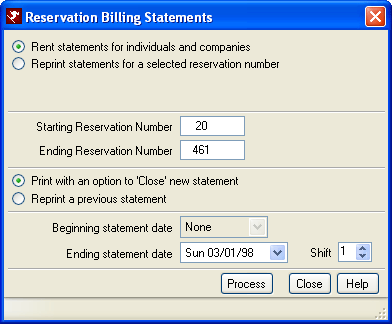
For example, the screen sample above is set to print statements for
reservations between Res# 20 and 461 ending March 1, 1998, with an option to
close the statement. The system searches for all reservations between
20 and 461 that have not yet been printed and will place a D@ on March 1st
and print the statements to the designated printer.
- Rent Statements for Individuals and Companies
- "Rent Statements for Individuals and Companies" allows the current
statement to be printed and closed. Closing a statement is a critical step,
since it puts a statement marker (transaction code D@) on the guest folio.
Once the D@ is added, the statement cannot be changed. When the current statement is
not closed, charges can be posted and printed as many times
as necessary. A range of reservation numbers can be selected when printing/closing
the current statement or reprinting prior statements. To close/print one reservation, make the starting and ending reservation numbers
match.
When "Rent Statements for Individuals and Companies" is selected, the system always prompts to "Close" the statements. Closing a statement is final: statements cannot be re-opened. Select the ending date and shift as the ending point of the statement. This might be shift three (3) of the last day of the month. All transactions up to that point in time will be included as part of the balance due on the statement marker. - Reprint Statements for Selected Reservation Number
- Select "Reprint Statements for Selected Reservation Number" to allow prior statements to be reprinted for one reservation only. The "Beginning Statement Date" drop-down is populated with all prior statement markers. Select a beginning date and the statement prints all charges from the beginning statement marker to the next statement marker found. To reprint prior statements for a range of guests, select the Rent statements instead and the "Reprint a Previous Statement" option. Note that when guests have different ending statement dates, this option does not work; hence selecting one at a time is the only option.
- Starting and Ending Reservation Number(s)
- Printing can be processed for one or more reservation number in sequence. When both the Starting and Ending Reservation Number fields match, then only one statement is selected. Otherwise, the process is run for the range of reservation number selected in the Starting and Ending Number fields.
- Print with an Option to Close New Statement
- When selected, reservations within the Starting and Ending Reservation Number fields that have not yet been closed (no D@ on the folio pertaining to the Ending Statement Date) are selected for printing and the user is prompted with the option to close the selected statements.
- Reprint a Previous Statement
- When selected, reservations within the Starting and Ending Reservation Number fields that have already been closed (an existing D@ on the folio pertaining to the Ending Statement Date) are selected for printing.
- Beginning Statement Date
- Select the starting date from which the system will search for transactions to include on the statement.
- Ending Statement Date
- Select the ending date from which the system will search for transactions to include on the statement. When closing statements, the system places a D@ on the folio with this date. When reprinting statements, the system looks for a D@ on the folio with this date.
- Shift
- Select which shift acts the ending point of the statement. This might be shift three (3) on the last day of the month. All transactions up to that point in time will be included as part of the balance due on the statement marker.
- Statement Report
- The default statement used for the reservation billing is the crystal report LongTermResStatement.rpt found in the FrontDesk reports folder. This report should be copied to a new file and then configured as the default report. There are other settings on the Long Term tab as well to define a default printer when the statements are printed and the e-mail address and subject information for when the reports are e-mailed to the guest.
Click these links for Frequently Asked Questions or Troubleshooting assistance.
04/05/2010
© 1983-2009 Resort Data Processing, Inc. All rights reserved.